
Yes—a home energy monitor can help you see when your household uses electricity, which is useful when your utility charges different prices during different periods. But the monitor does not know your current tariff unless a specific, verified system says it does. It also cannot decide which loads should move, identify every appliance, reproduce your utility bill, or guarantee savings.
The practical method is to keep two sources separate: your utility provides the official time-of-use schedule and billing rules; your energy monitor provides a view of measured electricity use over time. Align the two on the same dates, clock, and interval boundaries. Then look for repeated household routines that overlap the utility-defined peak period.
This guide follows one hypothetical household—the Lee family—without using a real utility, price, customer result, or product-performance claim.
What a time-of-use rate changes
A time-of-use, or TOU, rate changes the price of a kilowatt-hour according to a published schedule. The U.S. Energy Information Administration defines time-of-day pricing as a rate feature in which the price per kilowatt-hour depends on the time of day. Its energy efficiency and conservation overview notes that utilities may offer higher prices during peak-demand periods and lower prices during off-peak periods.
The exact schedule is local. It may vary by utility, customer class, season, weekday, weekend, holiday, or rate option. The EIA electricity price overview explains why costs and demand can change through the day, but EIA does not publish the retail peak and off-peak rates for an individual utility. Its rate-data FAQ directs readers to their utility tariff or an applicable rate database for those details.
That means the Lee family starts with its current utility document—not a generic internet schedule and not an assumption built from the energy monitor.
| Question | Source that owns the answer |
|---|---|
| Which hours are peak, off-peak, or shoulder? | The household’s current utility tariff or rate plan |
| Do weekends, holidays, or seasons use different periods? | The current utility tariff |
| How many kWh did the monitor record in a selected interval? | The configured monitor and its documented measurement boundary |
| Which exact meter values and adjustments determine the bill? | The utility meter, billing system, and statement |
| Which appliance caused every change? | Not proven by whole-home data alone |
| Will moving a routine lower the bill? | Only a later bill comparison under the actual tariff can show the result |
What an energy monitor can add
The monitor can turn a full-day total into a timeline. That is the useful contribution to a TOU decision.
For example, the Lee family may see that its measured kWh repeatedly increases during the utility-defined peak window on comparable weekdays. The family can then review known routines during that window: cooking, laundry, vehicle charging, cooling, water heating, or another scheduled activity. These are questions to investigate, not appliance identifications made by the monitor.
Depending on the verified monitoring scope, the dashboard may show whole-home totals, selected circuits, or another defined boundary. A wider measurement scope can reveal a household pattern; a narrower, correctly labeled scope may add context. Neither automatically tells the family which routine is safe, practical, or worthwhile to move.
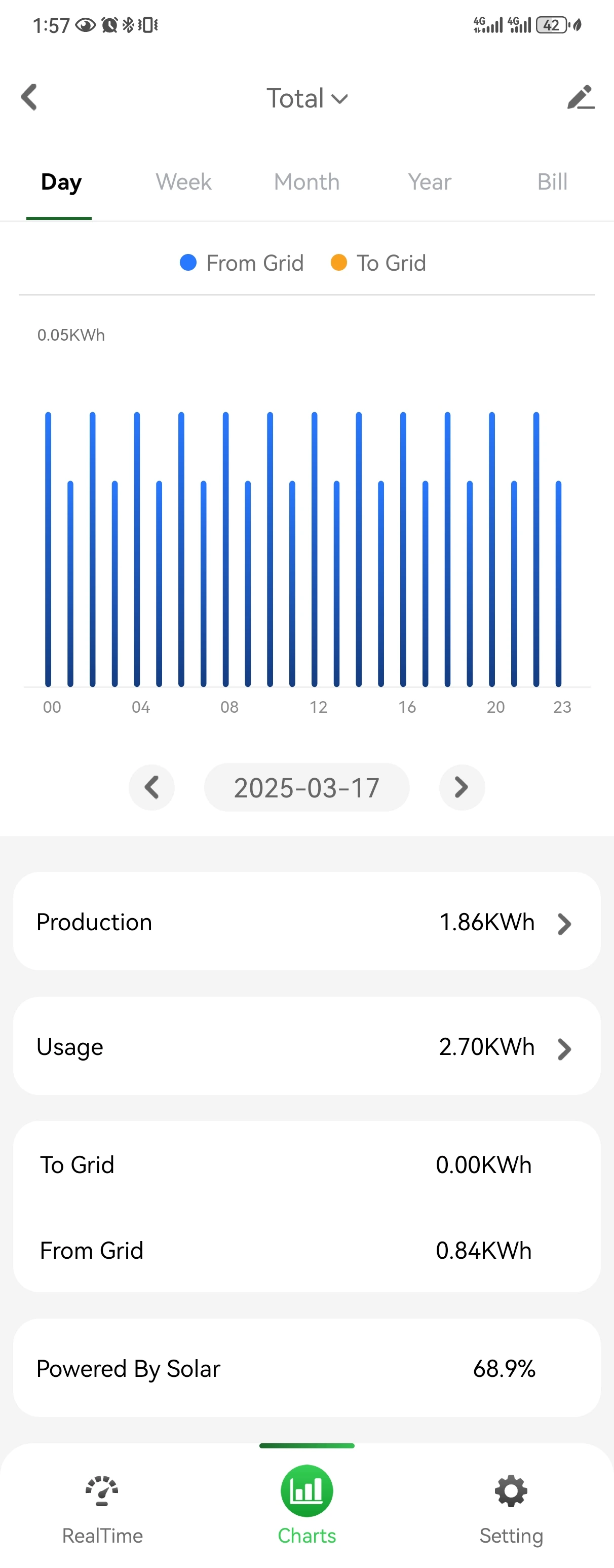
The image above demonstrates why interval visibility matters. A daily chart can show where use clusters across the day. It does not provide the Lee family’s utility rate, cost calculation, or a universal peak period.
What the monitor cannot establish
TOU analysis becomes misleading when a dashboard is treated as the utility bill.
An energy monitor cannot, by itself:
- confirm which tariff the household is enrolled in;
- know whether a date is a utility holiday or seasonal transition;
- assign the utility’s current price to every interval;
- include every fixed charge, tax, credit, minimum charge, or rate-specific adjustment;
- prove that its day boundary matches the utility meter’s interval boundary;
- identify every appliance from a whole-home change;
- determine whether a load is safe or appropriate to reschedule;
- replace the utility’s billing meter or a qualified electrical assessment;
- guarantee that a timing change will reduce the bill.
The U.S. Department of Energy’s guide to evaluating utility rate options separates energy charges, demand charges, and fixed charges because they respond differently to usage. A residential plan may not use every charge type, but the principle is important: the bill is the result of the actual tariff, not simply daily kWh multiplied by a guessed price.
Align the tariff and monitor in six steps
The Lee family uses a simple alignment workflow. It does not require opening an electrical panel, moving current transformers, changing wiring, or enrolling in a new rate.
1. Save the current utility schedule
The family records the exact rate-plan name and effective date from the utility. It notes each utility-defined period and checks whether the schedule changes by season, weekday, weekend, or holiday.
If the bill and utility portal disagree, the family asks the utility which document is current. The energy dashboard cannot resolve that ownership question.
2. Choose a complete, comparable day
The family selects a completed weekday that uses one known tariff schedule. It avoids mixing a partial day with a full day, a holiday with a normal weekday, or a summer schedule with a winter schedule.
One day is useful for learning the process. Several comparable days are needed before calling a pattern repeated.
3. Check clock and interval boundaries
The family confirms the dashboard time zone and the utility schedule’s local time. It notes daylight-saving transitions and checks whether the monitor displays hourly bars, shorter intervals, or a cumulative daily total.
A bar labeled “5 PM” may represent the interval beginning at 5 PM or ending at 5 PM. Product documentation should define that behavior. If it does not, the family should not pretend the boundary is known.
4. Mark the utility periods over the measured timeline
The family labels the chart with the official utility periods: peak, off-peak, and any shoulder period. It uses labels rather than copying a schedule from another utility or inventing a rate.
Now the household can ask a precise question: What share of the monitor’s measured use occurred during each utility-defined period on this selected day? That is a data-alignment question, not a bill forecast.
5. Add only known household context
The family writes down routines it actually knows happened: dinner was cooked, the dryer ran, the vehicle was plugged in, or the cooling schedule changed. It does not assign every chart movement to an appliance.
If circuit-level data is available and labels have been verified, it may narrow the question. The measurement scope and label still need to match the actual setup. This article does not authorize panel work or sensor changes.
6. Compare like days before changing a routine
The family repeats the review across several similar days. A routine becomes a useful candidate only when its timing repeatedly overlaps the utility-defined peak period and the household can consider a safe, practical alternative.
The family changes one ordinary routine at a time, if appropriate, and compares later bills under the same tariff. A lower peak-period kWh total is an observation. A lower bill is a separate result that must appear in utility billing evidence.
Use a clear ownership flow
The following flow keeps utility facts, monitor observations, household decisions, and bill outcomes separate.

This flow allows “keep observing” as a valid result. Not every household has a flexible routine during peak hours, and shifting timing may not reduce total kWh. Comfort, safety, equipment requirements, work schedules, and household needs remain real constraints.
Avoid four common TOU mistakes
Mistake 1: treating a kW spike as billed energy
Kilowatts show a rate of use at a moment. Kilowatt-hours show accumulated energy. A brief kW spike and a long-running moderate load can affect the day’s kWh differently. TOU energy charges are generally based on energy used within defined periods, so the family aligns kWh with time windows rather than pricing one instantaneous reading.
Mistake 2: applying someone else’s peak schedule
Peak periods are not universal. A neighboring utility, another state, an older bill, or a web example may use a different schedule. The family uses its own current utility tariff and records the effective season.
Mistake 3: assuming the monitor automatically knows cost
A cost display is meaningful only if the tariff inputs, periods, units, and effective dates are verified for that system. A generic dollar estimate should not be treated as the utility’s bill.
Mistake 4: calling correlation an appliance diagnosis
If measured use rises when dinner starts, the household has a timing clue—not proof that one appliance explains the full change. Several loads may overlap. Known routines, verified circuit labels, product documentation, and qualified support remain separate evidence.
Questions to answer before acting on the data
The Lee family can keep its TOU review grounded by answering these questions:
- What is the exact current tariff and effective season?
- Which dates are comparable weekdays, weekends, or holidays?
- Do the utility and monitor use the same local time and interval boundaries?
- What physical measurement scope does the monitor cover?
- Which household routines are known rather than inferred?
- Which timing changes are safe, practical, and allowed by equipment documentation?
- Will the family verify any claimed result on a later utility bill?
If any answer is unknown, record it as unknown. The goal is not to force a savings conclusion. It is to create a more accurate map of when measured household use overlaps the rate periods the utility actually applies.
The useful role of home energy monitoring
A home energy monitor can make TOU rates easier to understand because it adds time detail to household electricity use. Its role is visibility: show measured patterns, support comparisons, and help the household ask better questions.
The utility still owns the tariff and bill. The household owns routine decisions. A qualified electrical professional owns any panel assessment or installation work. Keeping those responsibilities separate produces a more reliable TOU review—and avoids turning a dashboard into a promise it cannot support.
Explore Grus home energy monitoring to review the solution context and the compatibility questions to ask next.