1. C ワイヤ アダプタとは何ですか?
As smart thermostats become increasingly popular in households, more and more users are looking to upgrade to smart thermostats to achieve more efficient energy management and convenient control. However, many users encounter a common issue during installation: the lack of aCワイヤ(共通ワイヤ).
The C-Wire is essential for running smart thermostats, as it provides a continuous power supply to support advanced features such as Wi-Fi connectivity, touch screen displays, and learning algorithms. Traditional HVAC (Heating, Ventilation, and Air Conditioning) or heat pump systems often lack a C-Wire, forcing users to seek alternative solutions when upgrading to smart thermostats.
TheCワイヤアダプタwas developed to address this problem. It works by redistributing existing HVAC wiring to create a virtual C-Wire, providing stable power to smart thermostats without the need for complicated rewiring or expensive equipment replacements.
2. Cワイヤの機能
| 関数 | 説明 |
|---|---|
| 継続的な電力供給 | The C-Wire delivers a constant 24VAC power supply to smart thermostats to support their core functions. |
| 高度な機能をサポート | Smart thermostats rely on the C-Wire for features like Wi-Fi, touch screens, remote control, and learning algorithms, which traditional thermostats do not require. |
Without a C-Wire, systems often resort to "power stealing," which intermittently draws power from the R-Wire or other control lines. This can lead to unstable power supply, affecting the performance of smart thermostats. For example, the device might lose its connection to Wi-Fi or respond sluggishly to commands.
3. Cワイヤアダプタの用途
The C-Wire Adapter is an ideal device for resolving the lack of a C-Wire in HVAC systems. By adjusting the existing wiring, it simulates the function of a C-Wire to ensure proper operation of smart thermostats. Common applications include:
3.1. スマートサーモスタットへの電力供給
- Smart thermostats require a low current, continuous power supply, which cannot be delivered by traditional R (power) and W (heating control) wires.
- The adapter reconfigures existing wires (e.g., G or Y wires) to supply an equivalent C-Wire power source.
3.2. レガシーシステムとの互換性
- Many older HVAC systems and heat pumps do not have a dedicated C-Wire connection, complicating upgrades to smart thermostats.
- The C-Wire Adapter ensures compatibility with these systems, avoiding costly rewiring or equipment replacement.
3.3. インストールの簡素化
- Traditional rewiring may involve cutting walls, adding wires, or reconfiguring the HVAC control board.
- C ワイヤ アダプタを使用すると、C ワイヤ機能がすぐに実現され、時間と労力が節約されます。
4. Cワイヤアダプタの仕組み
C-Wire Adapters work by redistributing existing wiring or extending the HVAC control interface to create a virtual C-Wire, providing power to smart thermostats. Key working methods include:
4.1. Gワイヤ(ファン制御ワイヤ)の再利用
- ハードウェアまたはソフトウェアによるファン制御を維持しながら、G ワイヤを C ワイヤとして再構成します。
- 利点: 追加の配線は不要で、ほとんどのシステムと互換性があります。
- 考慮事項: ファン制御ロジックの調整が必要になる場合があります。
4.2. 並列電源
- Splits power from the R-Wire (24VAC) and other control wires (e.g., W or Y) to provide a stable low-current supply.
- 利点: 柔軟な設置が可能で、多機能 HVAC システムに適しています。
4.3. 専用Cワイヤ生成
- HVAC 制御ボード インターフェイスを拡張して、専用の C ワイヤを生成します。
- 利点: 安定した動作を伴う複雑な多段加熱または冷却システムに適しています。
5. Cワイヤの接続方法
5.1. C-Wireと標準インターフェースロジック
| ターミナル | 機能説明 | 接続ロジック |
|---|---|---|
| R(パワー) | 24VAC電源を供給 | R をサーモスタットの R 端子に接続します。C ワイヤにより電源回路が完成します。 |
| C(コモン) | 継続的な電力供給 | Wi-Fi などの高度な機能を有効にするには、C をサーモスタットの C 端子に接続します。 |
| W(暖房) | 暖房システムを作動させる | W を加熱装置に接続します。C ワイヤは独立した電力を供給します。 |
| Y(冷却) | 冷却システムを作動させる | Y を冷却装置に接続します。C ワイヤは独立した電力を供給します。 |
| O/B(逆転弁) | ヒートポンプのモードを暖房と冷房の間で切り替えます | O/B をリバースバルブに接続します。C ワイヤはサーモスタットに電力を供給します。 |
This configuration ensures the C-Wire can deliver stable power to the thermostat while supporting heating, cooling, and fan functions.
5.2. Cワイヤアダプタの取り付け
The C-Wire Adapter is typically installed near the HVAC control board (often within the furnace or air handler). It redistributes existing wires to generate a "virtual" C-Wire. Common installation locations include:
a. HVAC制御ボード
- 最も一般的な場所。制御ボードに直接接続されます。
- 制御ボードは通常、次の内部にあります。
- 炉(ガスまたは電気)。
- 空調設備(ヒートポンプ用)。
b. サーモスタットの近く
- HVAC 機器の分解を避けるために、サーモスタットの後ろまたは近くに設置します。
- ツールが限られており、簡単なインストールを好むユーザーに適しています。
c. スタンドアロン電源モジュール
- If direct HVAC connection is not possible, standalone power modules can plug into a wall outlet to power the thermostat without modifying existing wiring.
6. Cワイヤアダプタの取り付け手順
6.1. Cワイヤの欠落を確認する
- HVAC 制御ボードとサーモスタットの配線レイアウトを検査します。
- C ワイヤまたは C 端子が使用できない場合は、C ワイヤ アダプタのインストールに進みます。
6.2. 互換性のあるアダプタを選択する
- Select a C-Wire Adapter compatible with your HVAC system and smart thermostat brand (e.g., Nest Power Connector, Honeywell C-Wire Adapter, or Grus EcoNet-TU).
6.3. アダプタをHVAC制御ボードに接続する
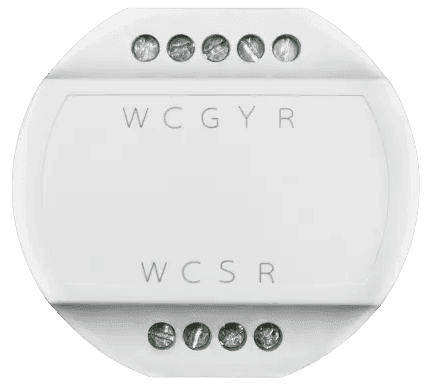
| アダプタ入力端子 | 機能説明 | HVAC制御ボードに接続する |
|---|---|---|
| R | 力 | HVAC制御盤のR端子 |
| C | 共通ワイヤ | HVAC制御ボードのC端子またはアダプタによって生成される |
| W | 暖房制御 | HVAC制御盤のW端子 |
| Y | 冷却制御 | HVAC制御ボードのY端子 |
| G | ファンコントロール | 既存のファン接続を維持する |
6.4. アダプタをサーモスタットに接続する
| アダプタ出力端子 | 機能説明 | サーモスタット端末に接続する |
|---|---|---|
| W | 加熱を作動させる加熱制御信号 | サーモスタットのW端子 |
| C | 継続的な電力供給のための共通ワイヤ | サーモスタットのC端子 |
| S | 特別指示のための信号制御 | サーモスタットの信号端子(サポートされている場合) |
| R | サーモスタットに供給する電源(24VAC) | サーモスタットのR端子 |
6.5. システムのテスト
- HVAC システムの電源を復元し、サーモスタットが正しく機能していることを確認します。
- 加熱、冷却、ファン機能をテストして、適切な接続を確認します。
7. 人気のCワイヤアダプタの比較
| ブランド | 特徴 | 理想的なアプリケーション |
|---|---|---|
| Grus EcoNet-TU | 複数のブランドと互換性があり、複雑なシステムをサポート | HVACおよびヒートポンプシステム、多段暖房/冷房 |
| Nest電源コネクタ | Nestサーモスタット専用に設計されており、簡単に設置できます | 単段暖房/冷房システム |
| Honeywell Cワイヤアダプタ | コンパクトなデザインで、ハネウェルのスマートサーモスタットに最適です。 | 単段または多段加熱/冷却 |
| Ecobee 電源エクステンダーキット | Ecobeeサーモスタットに含まれており、高度な機能をサポートします | 多段階の暖房/冷房、複雑な HVAC システム |
The C-Wire Adapter is a convenient solution for creating a C-Wire without requiring rewiring. By selecting the right adapter and following the standard installation process, users can enjoy the full benefits of a smart thermostat with minimal effort. Whether you use Nest, Honeywell, or Ecobee, the right adapter choice and installation can help upgrade your HVAC system to provide a smarter and more efficient home heating and cooling experience.
Learn how baseboard, heat pump, and HVAC smart thermostats work — plus setup tips and energy-saving strategies.
スマートサーモスタット暖房ガイドをお読みください→